Quickstart
In five minutes you will install kubepkg into a cluster and subscribe it to a package repository. Then you will install a package, change it, roll it back and remove it. You need a Kubernetes cluster, kubectl, and Helm 3.8 or newer.
The examples on this page are real output from a test cluster.
1. Install the CLI
Download the binary for your system from the latest release and check it against SHA256SUMS:
os=$(uname -s | tr A-Z a-z); arch=$(uname -m | sed 's/x86_64/amd64/;s/aarch64/arm64/')
curl -fsSLO "https://github.com/kuberoot-dev/kubepkg/releases/latest/download/kubepkg-${os}-${arch}"
curl -fsSL https://github.com/kuberoot-dev/kubepkg/releases/latest/download/SHA256SUMS | grep "kubepkg-${os}-${arch}" | shasum -a 256 -c -
install -m 0755 "kubepkg-${os}-${arch}" /usr/local/bin/kubepkg
The CLI talks to the cluster in your current kubeconfig context. To pick another one, pass --context <name>.
2. Install the operator
The operator does the installing. It ships as a Helm chart:
helm install kubepkg oci://ghcr.io/kuberoot-dev/charts/kubepkg \
  --namespace kubepkg-system --create-namespace --wait
This creates the kubepkg CRDs and starts the operator. By default the operator installs charts with Helm, in-process. Installing kubepkg covers the other backends and the chart's settings.
3. Subscribe to a repository
A repository is a signed index of packages. The example repository is built from kuberoot-dev/kubepkg-recipes. Fetch its public key and add it:
curl -fsSLO https://raw.githubusercontent.com/kuberoot-dev/kubepkg-recipes/main/keys/index.pub
$ kubepkg repo add main https://kuberoot-dev.github.io/kubepkg-recipes/index.yaml --public-key index.pub
repository main added
$ kubepkg repo list
NAME  PRIORITY  PACKAGES  READY  URL
main  0         6         True   https://kuberoot-dev.github.io/kubepkg-recipes/index.yaml
From now on the operator accepts this index only when the key has signed it. The operator refreshes the index every ten minutes. See what the repository offers:
$ kubepkg search
NAME                LATEST  REPOSITORY  DESCRIPTION
cdi                 1.66.1  main        Containerized Data Importer, disk images for KubeVirt
cert-manager        1.21.2  main        X.509 certificate management for Kubernetes
kube-state-metrics  2.20.0  main        Metrics about the state of Kubernetes objects
kubevirt            1.9.0   main        Virtual machines on Kubernetes
metrics-server      0.9.0   main        Resource metrics for autoscaling and kubectl top
virtualization      1.0.0   main        Virtual machines with disk image import (KubeVirt and CDI)
4. Look before you install
kubepkg plan resolves a package and everything it requires against the cluster. It changes nothing. The output lists what would be installed, which CRDs each package would own, and the permissions each package needs. It also says whether each package can be rolled back:
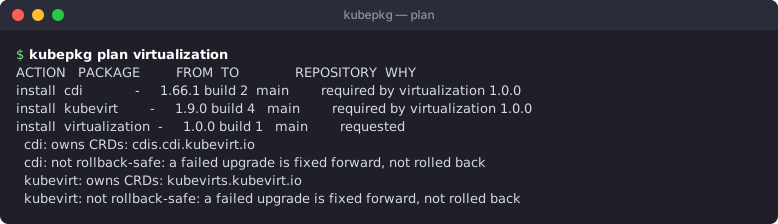
virtualization is a meta package. It installs nothing itself and requires KubeVirt and CDI at matching versions. Making a distribution explains how that works.
5. Install
kubepkg install shows the same plan and then writes one Package object per package. The operator does the rest:
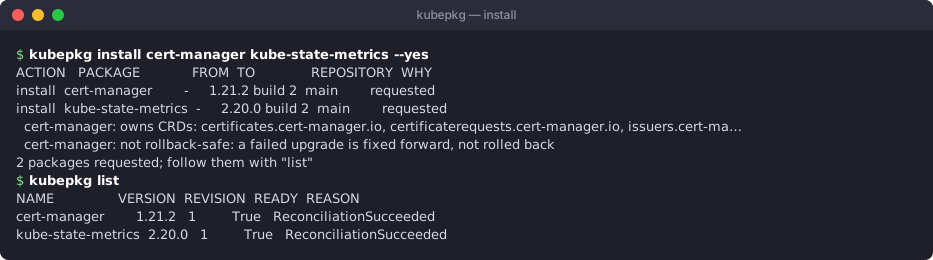
When you name no version, a package follows patch releases of the newest version in the repository. You can name a constraint instead: kubepkg install cert-manager@~1.21.
6. Change, look at the history, roll back
Every change to a package makes a new revision. Here the number of cert-manager replicas changes:

Revision 1 is still recorded, so you can go back to it. A rollback adds a new revision instead of rewriting history:
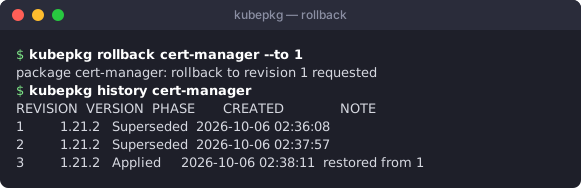
Everything kubepkg knows lives in ordinary Kubernetes objects:
$ kubectl get packages
NAME                 VARIANT   VERSION   REVISION   READY   STATUS
cert-manager                   1.21.2    3          True    rolled back to revision 1 on request; change the Package or set kubepkg.dev/retry to follow it again
kube-state-metrics             2.20.0    1          True    reconciliation succeeded, revision 1, 1 component(s)
$ kubectl get packagerevisions
NAME                   PACKAGE              REVISION   VERSION   PHASE
cert-manager-1         cert-manager         1          1.21.2    Superseded
cert-manager-2         cert-manager         2          1.21.2    Superseded
cert-manager-3         cert-manager         3          1.21.2    Applied
kube-state-metrics-1   kube-state-metrics   1          2.20.0    Applied
$ kubectl get packagesources
NAME                 VERSION   BUILD   REPOSITORY   AGE
cert-manager         1.21.2    2       main         2m9s
kube-state-metrics   2.20.0    2       main         40s
$ kubectl get repositories
NAME   URL                                                  PRIORITY   PACKAGES   READY   STATUS
main   https://kuberoot-dev.github.io/kubepkg-recipes/index.yaml              6          True    6 packages
7. Remove
$ kubepkg remove kube-state-metrics --yes
remove  kube-state-metrics  (requested)
1 packages removed; the operator uninstalls them
kubepkg refuses to remove a package while another installed package requires it. --autoremove also removes requirements that nothing needs any more. When a package is removed, the CRDs it owned stay in the cluster by default, and so do the objects of those types. Set crdPolicy: Delete on the Package to remove them as well.
Next
- Concepts: what a package, a revision and a repository are.
- Installing and upgrading packages: values, variants, constraints, and everything else the commands above can do.
- Building packages: package your own software, or someone else's, into your own repository.