Repositories and trust
A repository is one file, index.yaml, served over HTTP(S). It lists every version of every package the repository offers. Each version carries its full PackageSource spec, with every chart pinned by digest. The charts themselves live in an OCI registry. Because the index pins everything, its signature covers everything the repository installs.
Subscribing a cluster
kubepkg repo add main https://packages.example.org/index.yaml --public-key release.pub
kubepkg repo add vendor https://vendor.example.com/index.yaml --public-key vendor.pub --priority 20
kubepkg repo list
kubepkg repo remove vendor
repo add creates a Repository object. You can also write one yourself, or list repositories in the chart's values:
apiVersion: kubepkg.dev/v1
kind: Repository
metadata:
  name: main
spec:
  url: https://packages.example.org/index.yaml
  priority: 10        # higher wins, see below
  interval: 10m       # how often the operator refreshes the index
  publicKeys:
    - |
      -----BEGIN PUBLIC KEY-----
      MCowBQYDK2VwAyEA...
      -----END PUBLIC KEY-----
$ kubepkg repo add main https://kuberoot-dev.github.io/kubepkg-recipes/index.yaml --public-key index.pub
repository main added
$ kubepkg repo list
NAME  PRIORITY  PACKAGES  READY  URL
main  0         6         True   https://kuberoot-dev.github.io/kubepkg-recipes/index.yaml
The Ready condition of a repository has one of these reasons:
| Reason | Means |
|---|---|
IndexLoaded |
the index was fetched, verified and accepted |
FetchFailed |
the index could not be downloaded; the one accepted before stays in use |
InvalidIndex |
the file is not a valid index |
IndexRefused |
a signature is missing or wrong, the index or root has expired, or the index is older than one already accepted |
A refused or failed refresh never removes packages. The index accepted before stays in use until a valid newer one arrives.
The operator fetches the index again every interval, and a minute after a failed fetch. It asks the server whether the index changed since the last fetch (ETag), so an unchanged index is not downloaded again, and an index that did not change does not make packages select their versions again. To fetch it now, change any annotation on the Repository:
kubectl annotate repository main kubepkg.dev/refresh="$(date +%s)" --overwrite
A new version or build that matches a Package's constraint is installed as soon as the index that carries it is accepted, also when the package is waiting to retry a failed change.
Which repository a package comes from
When several repositories carry the same package, the one with the highest priority supplies it, even when it has no version matching your constraint. Without that rule, a package your vendor's repository carries could silently come from a community repository just because the community had a newer number. Within the chosen repository, the newest version and build matching the constraint wins.
To take a package from one particular repository, set Package.spec.repository. To take it from nowhere but your own build, write a PackageSource by hand.
After a restart, the operator chooses no versions until every repository has been fetched once. Otherwise a low-priority index that happened to load first could win for a moment.
Publishing a repository
Your repository needs two places:
- an OCI registry for the charts, such as GitHub Container Registry, Harbor, Zot or a cloud registry;
- a static web host for
index.yamland its signatures, such as GitHub Pages, S3 or nginx.
The usual flow, for example in CI:
# 1. build every recipe; each writes dist/<pkg>-<version>-<build>.yaml
for r in recipes/*/; do
  kubepkg build "$r" --registry oci://ghcr.io/example/packages -o dist
done

# 2. index them, keeping what was published before, signed
kubepkg repo index dist -o site/index.yaml \
  --merge https://packages.example.org/index.yaml \
  --sign-key-env KUBEPKG_SIGNING_KEY

# 3. publish site/ (index.yaml, index.yaml.sig) to the web host
repo index enforces what makes a repository trustworthy:
- every version is an exact semver version and is defined once;
- every chart is pinned by digest. Charts without one are downloaded and pinned in the index, and
--verifydownloads pinned charts again to check them; - with
--merge, versions published before are kept even when their recipes are gone. A version rebuilt under the same version and build must come out identical: published versions never change. A changed recipe needs a new build number.
The repository in kuberoot-dev/kubepkg-recipes does exactly this from GitHub Actions. Copy its scripts/build-all.sh and workflow as a starting point.
Signing with plain keys
The simple mode uses one or more ed25519 keys. A cluster accepts an index signed by any key it trusts.
kubepkg repo keygen release                        # release.key (private), release.pub
kubepkg repo index dist --sign-key release.key     # writes index.yaml and index.yaml.sig
kubepkg repo add main https://packages.example.org/index.yaml --public-key release.pub
Keep release.key out of the repository. In CI, pass it as a secret with --sign-key-env.
A repository with no keys at all is refused. For a local test repository, accept it explicitly with --allow-unsigned (allowUnsigned: true in the Repository or in the chart's repositories). Its packages then install whatever the server says they are.
This mode is enough for a small repository. Its limits are those of a single key: anyone holding it can sign anything, and replacing it means touching every cluster.
A root of trust
For repositories that many clusters depend on, kubepkg implements the core of The Update Framework. Trust is split into roles, each signed by several keys with a threshold, and keys can be rotated without touching clients.
The repository publishes root.yaml next to its index, plus every version of it as root/<N>.yaml. The root names:
- the root keys and how many of them must sign a new root version;
- the index keys and how many of them must sign the index;
- an expiry date.
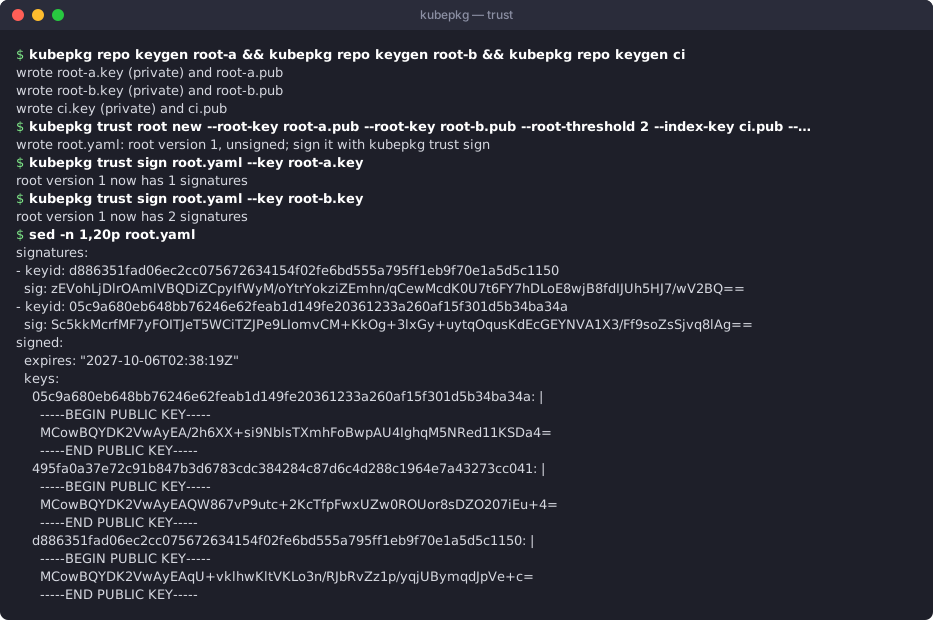
# Keys: root keys belong to people and live offline; the index key lives in CI.
kubepkg repo keygen alice && kubepkg repo keygen bob && kubepkg repo keygen carol
kubepkg repo keygen ci

# Root version 1: any 2 of 3 root keys, 1 index key, valid for a year.
kubepkg trust root new \
  --root-key alice.pub --root-key bob.pub --root-key carol.pub --root-threshold 2 \
  --index-key ci.pub --index-threshold 1 --expires 8760h -o root.yaml

# Each root key holder signs, on their own machine.
kubepkg trust sign root.yaml --key alice.key
kubepkg trust sign root.yaml --key carol.key

# Publish it as root.yaml and as root/1.yaml. CI signs each index, valid for 30 days.
kubepkg repo index dist --expires 720h --sign-key-env KUBEPKG_INDEX_KEY
Clusters pin the root keys of version 1 and the threshold:
kubepkg repo add main https://packages.example.org/index.yaml \
  --root-key alice.pub --root-key bob.pub --root-key carol.pub --root-threshold 2
# or in the chart's values
repositories:
  - name: main
    url: https://packages.example.org/index.yaml
    trust:
      rootThreshold: 2
      rootKeys: ["-----BEGIN PUBLIC KEY-----\n...", "...", "..."]
What the cluster checks
On every refresh the operator:
- fetches
root.yamland walks the chain from the version it last accepted. Each new version must be signed by a threshold of the previous version's root keys and a threshold of its own; - refuses a root older than the one it accepted, and a different root under a version it already accepted. That second case is a fork, which someone holding stolen old keys could make;
- refuses an expired root;
- checks that the index is signed by a threshold of the index keys the current root names, and that the index has not expired;
- refuses an index older than one already accepted, so a validly signed old index cannot be replayed.
The accepted root's version and digest are recorded in the Repository's status (rootVersion, rootDigest).
Rotating keys
To replace a key, make the next root version. Both the old and the new root keys sign it:
kubepkg trust root next root.yaml \
  --root-key alice.pub --root-key bob.pub --root-key dave.pub --root-threshold 2 \
  --index-key ci2.pub --index-threshold 1 --expires 8760h
kubepkg trust sign root.yaml --key alice.key     # old root keys: a threshold of version 1
kubepkg trust sign root.yaml --key bob.key
kubepkg trust sign root.yaml --key dave.key      # new root keys: a threshold of version 2
# publish it as root.yaml and as root/2.yaml; root/1.yaml stays
Clusters follow the chain on their next refresh. Nothing on the clusters changes: they still pin the keys of version 1.
Delegating packages to teams
With one index key, whoever holds it can publish any version of any package. In a repository that several teams feed, that key usually lives in a shared CI. A root can hand some packages to their own team's keys instead:
kubepkg trust root next root.yaml --delegate 'virt=cdi,kubevirt-*' \
  --delegate-key virt=anna.pub --delegate-key virt=oleg.pub --delegate-threshold virt=2
The root keys sign this version as usual. From then on, a version of cdi or of any kubevirt-* package is accepted only with two signatures of the virt team's keys, whatever key signed the index. The team signs the PackageSources kubepkg build wrote, each member on their own machine, and commits them:
kubepkg trust sign dist/cdi-1.66.1-2.yaml --key anna.key
kubepkg trust sign dist/cdi-1.66.1-2.yaml --key oleg.key
The signatures go into the kubepkg.dev/signatures annotation. That annotation is outside the spec digest, so a signature can also be added to a version already published. repo index copies them into the index. A signature covers the package name, its version, build and spec digest, so it cannot be moved to another build or package.
Clients leave out every version of a delegated package that lacks enough of its team's signatures, and report it: the CLI prints a warning whenever it reads the repository, and the Repository's status message names the version. The rest of the index is used as usual. Patterns follow shell globbing (kubevirt-*). Delegations are tried in order, and the first that matches a package applies. trust root next keeps the current delegations, replaces one given again with --delegate, and removes one with --undelegate.
Clients older than 0.5 cannot read a root with delegations and refuse it. Upgrade clusters before you publish the first delegation.
Expiry is a feature
Index expiry forces CI to re-sign the index regularly, even when nothing changed. That is the point. A mirror or a man in the middle that keeps serving an old, validly signed index is caught within the expiry period. Choose --expires longer than your longest expected outage of the build pipeline: a month is common. The chart's alert KubepkgRepositoryStale fires when an index has not changed for longer than metrics.prometheusRule.indexMaxAge. Set that below the expiry, and you hear about a stuck pipeline before clusters start refusing its index.
Moving to another registry
Published versions never change, but the place their charts live may. To move a repository's packages to another registry path, copy the artifacts there unchanged, digests included (oras cp), and index with --relocate:
kubepkg repo index dist --merge https://old.example.org/index.yaml \
  --relocate oci://registry.old.example.org/packages=oci://registry.example.org/packages
Every chart of a relocated version is fetched from its new place and must have the digest it was published with, so what the version installs stays the same. Its spec digest changes with the location, and clusters apply that as a new revision with the same charts, which changes nothing in their workloads. Versions signed by a delegation need signing again. The old artifacts can stay where they are for clusters that have not refreshed yet.
Private registries
Charts and package trees in a registry that needs a login are pulled with credentials from kubernetes.io/dockerconfigjson Secrets in the cluster:
kubectl -n kubepkg-system create secret docker-registry registry-creds \
  --docker-server=registry.example.org --docker-username=bot --docker-password="$TOKEN"
helm upgrade kubepkg oci://ghcr.io/kuberoot-dev/charts/kubepkg -n kubepkg-system --reset-then-reuse-values \
  --set 'registrySecrets={registry-creds}'
The operator reads the Secrets on every pull, so rotated credentials apply without a restart. A Secret that does not exist means no credentials: the operator logs a warning once and pulls anonymously until it appears. A distribution can therefore set registrySecrets by default and leave creating the Secret to the users who need it. Each registry gets the entry for its host, and one Secret can hold several. An operator that runs outside the cluster can use a Docker config file instead, with --registry-config; the Secrets are tried first. This applies to OCI registries with the helm and werf backends. Flux and Argo CD pull charts themselves, with their own credentials.
Registries without TLS
A registry in the cluster or on a lab network often speaks plain HTTP. Name it, and only it, so every other registry keeps TLS:
apiVersion: kubepkg.dev/v1
kind: Repository
metadata:
  name: lab
spec:
  url: http://registry.lab:8080/index.yaml
  publicKeys: ["..."]
  plainHTTPRegistries: ["registry.lab:5000"]   # host or host:port
kubepkg repo add lab <url> --plain-http-registry registry.lab:5000 writes the same. A registry either speaks TLS or does not, so a host listed by any Repository is reached without TLS for every chart and package tree on it, while ghcr.io and the rest stay on TLS. Registries that no Repository lists, such as a mirror, go in the operator's --plain-http-registry flag (chart value plainHTTPRegistries). The index URL is fetched with the scheme it names. With the flux backend, the OCIRepository of a chart on such a registry is marked insecure; the argo backend leaves registry access to Argo CD's own repository settings.
The CLI commands that read registries take --plain-http-registry as well (build for its sources, repo index, bundle create, init, validate, images).
The operator flag --plain-http and the chart value plainHTTP take every registry off TLS, public ones included. They still work and are deprecated: use the per-registry settings instead.
Mirrors and air-gapped clusters
An index pins charts at the registry they were built into, and the operator fetches them from there. To serve clusters that cannot reach that registry, build the same recipes into your own registry and publish your own index, signed by your own keys:
kubepkg build recipes/cert-manager --registry oci://registry.internal/packages -o dist
kubepkg repo index dist -o index.yaml --sign-key internal.key
The same recipe always builds the same chart content, so the packages are the same packages. Only the place they live and the key that vouches for them differ. A distribution that wants to rewrite image references for its registry as well does so with a build step plugin, described in Building packages.