Making a distribution
A Kubernetes distribution is a cluster plus a chosen set of components at versions that are known to work together: networking, storage, certificates, monitoring, virtualization and whatever else the distribution is for. kubepkg gives a distribution four things:
- its own package repository, built from recipes, so the distribution decides what every component contains, with patches where it disagrees with the upstream;
- meta packages, which name a set of components and their versions, so "version 2.0 of the distribution" is something you can install and upgrade;
- platform-wide values, so settings such as the cluster domain reach every component without each package knowing about them;
- ways to adapt kubepkg itself: its API group, plugins and Go libraries. See Embedding in a platform.
This page walks through the first three, using the example repository kuberoot-dev/kubepkg-recipes.
1. A repository of your components
Start a recipe for each component and adjust it until kubepkg validate passes:
kubepkg init recipes/cert-manager --chart https://charts.jetstack.io/cert-manager@v1.21.2
kubepkg init recipes/kubevirt --version 1.9.0 \
  --manifest https://github.com/kubevirt/kubevirt/releases/download/v1.9.0/kubevirt-operator.yaml
kubepkg validate recipes/*
This is where the distribution's own choices live. The example repository makes these:
- cert-manager installs its CRDs as part of the package (
crds.enabled: true), so the CRDs are upgraded and owned with it rather than left for someone to apply by hand. - KubeVirt is built from the upstream release manifests, not from a third-party chart. A patch removes virt-operator's hard requirement for control-plane nodes, which managed clusters and clusters with a hosted control plane do not have. The package also ships its own small chart with the
KubeVirtresource, andreadyWhenwaits until KubeVirt reportsAvailable. - Each package declares whether rolling it back is safe. For cert-manager and KubeVirt it is not, because their storage versions only move forward.
Publish it as described in Repositories and trust. Every merge to main builds the packages, and every published version stays as it is forever.
2. Meta packages
A recipe without charts builds a meta package, which consists only of requirements:
apiVersion: kubepkg.dev/v1
kind: Recipe
metadata:
  name: virtualization
  annotations:
    kubepkg.dev/description: Virtual machines with disk image import (KubeVirt and CDI)
spec:
  version: 1.0.0
  build: 1
  package:
    variants:
      - name: default
        requires:
          - {package: kubevirt, version: "~1.9"}
          - {package: cdi, version: "~1.66"}
kubepkg install virtualization installs KubeVirt and CDI at matching versions, in the right order, and then the meta package itself. The meta package is ready once all its members are.
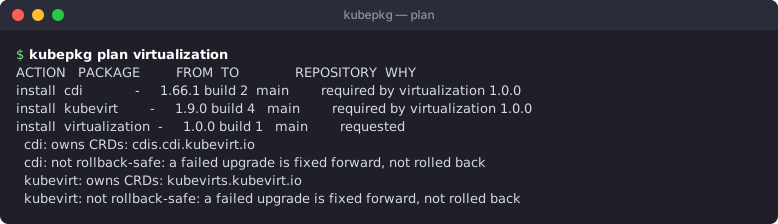
The whole distribution is one more meta package:
apiVersion: kubepkg.dev/v1
kind: Recipe
metadata:
  name: mydistro
spec:
  version: 2.0.0
  package:
    variants:
      - name: default
        requires:
          - {package: cert-manager, version: "~1.21"}
          - {package: kube-state-metrics, version: "~2.20"}
          - {package: virtualization, version: "~1.0"}
      - name: minimal
        requires:
          - {package: cert-manager, version: "~1.21"}
Upgrading a distribution
Each member's Package gets the constraints that the packages requiring it set, and all of them must hold. When mydistro 2.1.0 requires cert-manager ~1.22, installing mydistro@2.1.0 over 2.0.0 moves cert-manager to 1.22. Members that nothing pins follow patch releases. The meta package's revision history records each step, like any package's history.
Variants give a distribution profiles: kubepkg install mydistro --variant minimal.
Shaping the members
A distribution often wants a member a little different from its defaults: the metrics stack without Grafana because the distribution ships another dashboard tool, a smaller retention, a lighter variant. A requirement can say so, without a fork of the member's recipe:
  package:
    variants:
      - name: default
        requires:
          - package: victoria-metrics
            version: "~1.153"
            variant: default                # which variant of the member to install
            components:                     # values for the member's components, by name
              victoria-metrics:
                values:
                  grafana: {enabled: false}
variantpicks the member's variant.kubepkg installwrites it to the member'sPackage, and the requirement counts as met only while the member runs that variant. When the member'sPackagealready names another variant, the plan stops and says so: that choice was made by hand.componentspasses values to the member's components. The operator reads them from the requiring packages in the cluster, so they change when the distribution moves to a version that passes other values, and go away when it is removed. The member's values are layered, from lowest to highest: the package's defaults, the platform values, the values passed by the packages requiring it, the values set on the member's ownPackage. A cluster admin therefore still has the last word.- Two packages that pass different values for the same key of the same member, or ask for different variants, are a conflict. Nothing picks a winner:
kubepkg planfails and names both, and in the cluster the member reportsConflictingRequirementsand keeps running what it ran until one of them changes. Values that agree, or set different keys, merge.
kubepkg plan shows, for each member, the variant it is installed in and the values passed to it. Versions that use variant or components in a requirement need kubepkg 1.3 or later; an older cluster or CLI leaves just those versions out of the index and says so, as for anything built for a newer kubepkg.
3. Platform-wide values
Some values belong to the cluster, not to a package: the cluster domain, the ACME issuer, a registry mirror, the storage class. Put them in one Secret, and the operator layers them under every component's values:
apiVersion: v1
kind: Secret
metadata:
  name: platform-values
  namespace: kubepkg-system
stringData:
  values.yaml: |
    global:
      clusterDomain: cluster.local
      domain: apps.example.org
      issuer: letsencrypt-prod
helm upgrade kubepkg oci://ghcr.io/kuberoot-dev/charts/kubepkg -n kubepkg-system --reuse-values \
  --set valuesSecret=kubepkg-system/platform-values
Charts read the values as usual (.Values.global.domain). Package defaults and user values override them. Keys a chart does not know are ignored by almost every chart, so keep platform values under a key such as global that no chart uses for something else. The exceptions are charts whose values.schema.json forbids unknown keys (additionalProperties: false). With the helm and werf backends, such a chart gets only the platform keys its schema declares, and is installed unmodified. Flux and Argo CD merge values themselves, so a strict chart there needs the annotation below. A hand-written PackageSource can opt out entirely with the annotation kubepkg.dev/skip-platform-values: "true".
4. Shipping it
A distribution installs kubepkg already subscribed to its repository, with the distribution's key, and then installs its meta package:
valuesSecret: kubepkg-system/platform-values
namespaceLabels:
  example.org/managed: "true"
repositories:
  - name: mydistro
    url: https://packages.example.org/index.yaml
    priority: 100
    trust:
      rootThreshold: 2
      rootKeys: [...]
helm install kubepkg oci://ghcr.io/kuberoot-dev/charts/kubepkg -n kubepkg-system --create-namespace -f values.yaml
kubepkg install mydistro@2.0.0 --yes
Users can still subscribe to other repositories. Because yours has the highest priority, any package your repository carries always comes from you.
For many clusters, put the distribution's packages in a PackageSet on a hub. See Several clusters.