Building packages
The packages in a repository are built by its maintainers from upstream sources, the way Debian builds .deb files from upstream tarballs. What the upstream ships does not matter: release manifests, a Helm chart, or a source archive with a chart somewhere inside. Each becomes an ordinary Helm chart in your registry, pinned by digest, and installing it never contacts the upstream again.
A recipe says how to build one package. It is a directory with recipe.yaml, plus any charts, overlays or patches you maintain next to it.
Starting a recipe
kubepkg init downloads the upstream, pins it, and writes a first recipe:
# from a published chart
kubepkg init recipes/podinfo --chart oci://ghcr.io/stefanprodan/charts/podinfo@6.9.2
kubepkg init recipes/cert-manager --chart https://charts.jetstack.io/cert-manager@v1.21.2

# from release manifests
kubepkg init recipes/kubevirt --version 1.9.0 \
  --manifest https://github.com/kubevirt/kubevirt/releases/download/v1.9.0/kubevirt-operator.yaml
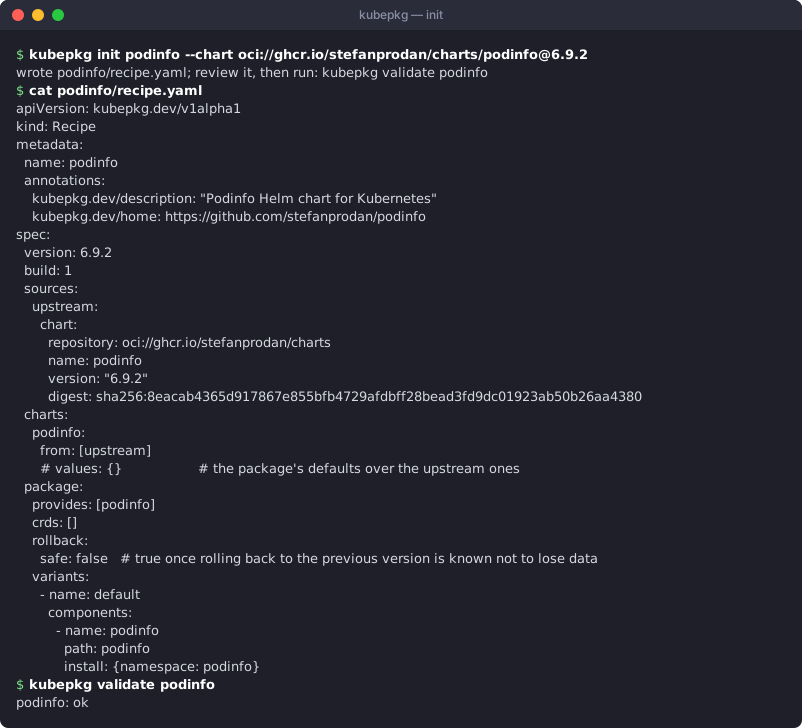
init takes the description from the chart and drops Namespace objects from manifests, because kubepkg creates namespaces itself. It also lists the CRDs the upstream ships, because a package must declare the CRDs it owns. Review the result. It is a starting point, not a finished package.
The recipe
apiVersion: kubepkg.dev/v1
kind: Recipe
metadata:
  name: kubevirt
  annotations:
    kubepkg.dev/description: Virtual machines on Kubernetes
    kubepkg.dev/home: https://kubevirt.io
spec:
  version: 1.9.0          # the upstream version
  build: 4                # our fourth packaging of it
  sources:                # every source is pinned
    operator:
      url: https://github.com/kubevirt/kubevirt/releases/download/v1.9.0/kubevirt-operator.yaml
      sha256: f11307caafc3c23ffedf9887d8beb5a4419e2694da242fa68f63d1ec820de2e0
    kubevirt:
      dir: charts/kubevirt  # a chart we maintain, next to the recipe
  charts:                 # what goes into the package
    kubevirt-operator:
      from: [operator]    # plain manifests are wrapped into a chart
      exclude: [{kind: Namespace}]
      patches:
        # Upstream requires control-plane nodes for virt-operator; clusters
        # with a hosted control plane have none.
        - kind: Deployment
          name: virt-operator
          merge:
            spec:
              template:
                spec:
                  affinity:
                    nodeAffinity:
                      requiredDuringSchedulingIgnoredDuringExecution: null
    kubevirt:
      from: [kubevirt]    # a chart source is used as is
  package:                # the PackageSource: what the operator installs
    provides: [kubevirt, "api:kubevirt.io/v1"]
    crds: [kubevirts.kubevirt.io]
    rollback: {safe: false}
    variants:
      - name: default
        requires:
          - {package: cdi, optional: true}
        components:
          - name: operator
            path: kubevirt-operator
            install: {namespace: kubevirt}
          - name: kubevirt
            path: kubevirt
            install:
              namespace: kubevirt
              dependsOn: [operator]
              readyWhen:
                - {apiVersion: kubevirt.io/v1, kind: KubeVirt, name: kubevirt, condition: Available}
Sources
| Source | Is |
|---|---|
url + sha256 |
a file, or a .tar.gz/.tgz archive; path selects a file or directory inside the archive |
chart |
a published Helm chart (repository, name, version, digest) in an HTTP repository or an OCI registry |
dir |
a directory next to the recipe, for charts and manifests you maintain |
plugin + with |
fetched by a source plugin, for example from git or an internal artifact store |
Everything is checked against its checksum or digest. A changed upstream file fails the build instead of changing the package.
Charts
A chart is made either from one chart source, used as is, or from manifests: one or more sources of plain YAML, wrapped into a chart that applies them verbatim. Their content never passes through the template engine, so {{ in a ConfigMap stays {{. On top of that:
valuesset the package's defaults, merged over the chart'svalues.yaml. Users can still override them;overlay: diradds or replaces files in the chart, for changes values cannot express;excludedrops objects from wrapped manifests;patcheschange objects of wrapped manifests with JSON merge patches, wherenullremoves a field. This is how a Debian package patches its upstream. A patch that matches no object fails the build, so an upstream rename cannot silently ship an object unpatched;stepsrun step plugins on the finished chart.
The package
package is the PackageSource spec the operator installs: provides, conflicts, crds, permissions, rollback and variants with their components. Components refer to built charts by path, the chart's name under charts. The build fills in the version and the digests. See Upgrades, readiness and hooks for dependsOn, readyWhen, phase: PreUpgrade and rollback.safe, and the recipe reference for every field.
Checking upstream signatures
Many upstreams sign their container images with cosign. A recipe can require it, the way a Debian package checks the upstream's signing key:
spec:
  verify:
    images:
      # signed by the cert-manager maintainers with a key they publish
      - repositories: [quay.io/jetstack/*]
        key: keys/cert-manager-pubkey-2021-09-20.pem
        signatureDigest: sha512
        ignoreTransparencyLog: true
      # signed keyless by Kubernetes release engineering
      - repositories: [registry.k8s.io/*/*]
        identity: krel-trust@k8s-releng-prod.iam.gserviceaccount.com
        issuer: https://accounts.google.com
kubepkg validate and kubepkg build run cosign verify on every pinned image a rule covers, by digest, and fail on an image that is not signed as the rule says. That happens before anything is published. From then on, the repository's own signature vouches for the package, so clusters do not need cosign or network access to the upstream's keys. Images no rule covers are reported, so an unsigned upstream stays visible.
keyis a public key file next to the recipe;identityandissuercheck a keyless signature: the certificate's subject and the OIDC issuer that vouched for it.signatureDigestandignoreTransparencyLogfollow the upstream's own instructions. cert-manager, for example, signs with a key in Google Cloud KMS and records nothing in the Rekor transparency log. A keyless rule cannot skip the log: only the log proves the short-lived certificate was valid when the image was signed.cosignmust be onPATHwherever a recipe with rules is validated or built; without it the recipe is refused rather than built unchecked.
Charts can be checked the same way. Some upstreams sign their Helm charts with a provenance file (.prov) and publish a GPG keyring:
spec:
  verify:
    charts:
      - sources: [chart]
        keyring: keys/cert-manager-keyring-2021-09-20-1020CF3C033D4F35BAE1C19E1226061C665DF13E.gpg
validate and build download the provenance file from where the chart is published, next to the archive in a chart repository or as its provenance layer in an OCI registry. They then check it as helm verify does: the signature against a key in the keyring, and the archive's hash in the signed message.
Validating
kubepkg validate recipes/kubevirt recipes/cert-manager
validate builds without publishing. It renders every chart with its defaults and checks the package against what the charts contain. A CRD that a chart ships but the package does not declare is an error, because a CRD nobody owns is a CRD two packages can fight over. Run it on every pull request.
Building and publishing
kubepkg build recipes/kubevirt --registry oci://ghcr.io/example/packages -o dist
build fetches and checks the sources, builds the charts, and pushes each one as an ordinary Helm OCI chart: oci://ghcr.io/example/packages/kubevirt/kubevirt-operator:1.9.0-4. It writes dist/kubevirt-1.9.0-4.yaml, the PackageSource that installs those charts by digest. kubepkg repo index dist turns such files into the repository index. See Repositories and trust.
Because built packages are plain Helm charts, Helm, Flux, Argo CD and werf can install them without kubepkg:
helm install kubevirt-operator oci://ghcr.io/example/packages/kubevirt/kubevirt-operator --version 1.9.0-4
Versions, builds and immutability
spec.version is the upstream version, and spec.build numbers your packagings of it. Fixing a packaging bug means build: 5, with the same upstream version. Constraints match the upstream version. Of two builds, the higher is newer.
The same recipe always builds the same content. A package's identity is that content: the digest of its uncompressed chart files, recorded on the artifact as dev.kubepkg.content.digest. Compressed bytes differ between compressors and Go versions, so identity does not depend on them. Tags are immutable:
- if the tag already holds the same content, the published artifact is reused, so rebuilding an unchanged recipe on another machine publishes nothing new;
- if the content differs under the same version and build, the build fails. Bump
build.
Each chart is published under the name of its entry in charts and the version <version>-<build>, for example 2.3.0-1. appVersion stays as upstream set it. Templates see the published values: a chart that builds an image tag from .Chart.Version asks for v2.3.0-1, not v2.3.0. validate, images and render show exactly what the cluster will get, so such a tag shows up there. Set the image tag in the chart's values instead.
Plugins
A distribution extends builds without changing kubepkg. A source plugin fetches a source:
sources:
  app:
    plugin: git
    with: {url: https://git.example.org/app.git, commit: 3f1c2e9, path: deploy/chart}
A step plugin changes a finished chart, for example to move images to the distribution's registry:
charts:
  app:
    from: [app]
    steps:
      - plugin: relocate-images
        with: {registry: registry.example.org/mirror}
A plugin is either Go code registered in build.Options.Plugins, or an executable on PATH named kubepkg-source-<name> or kubepkg-step-<name>, written in any language. An executable plugin:
- reads
withas JSON on standard input; - gets its directories from the environment:
KUBEPKG_OUT, an empty directory a source plugin fills, orKUBEPKG_CHART, the chart a step plugin changes; - learns the package from
KUBEPKG_PACKAGEandKUBEPKG_VERSION; - runs in the recipe directory, and fails the build by exiting with a non-zero status.
#!/usr/bin/env bash
# Points the chart's images at the distribution's registry.
set -euo pipefail
registry=$(jq -r .registry)
yq -i ".image.registry = \"${registry}\"" "${KUBEPKG_CHART}/values.yaml"
Plugins must be deterministic. A plugin that fetches "latest" or stamps the time breaks reproducible builds, and with them the immutability checks.
A repository of recipes in CI
kuberoot-dev/kubepkg-recipes is a complete example:
recipes/<name>/recipe.yamlfor each package;- on every pull request,
kubepkg validateruns for every recipe; - on every merge,
scripts/build-all.shbuilds every recipe intoghcr.io/kuberoot-dev/kubepkg-packages, merges the index with the published one, signs it with a key from a repository secret, and publishes it to GitHub Pages.
Fork it, point REGISTRY at your registry, generate a key with kubepkg repo keygen, store the private key as the KUBEPKG_SIGNING_KEY secret, and you have a package repository.