Backends: Helm, werf, Flux, Argo CD
The operator decides what to install and in which order. A backend does the installing. Every backend gets a package's components one at a time, in dependency order, so ordering, requirements, readyWhen, hooks and revisions behave the same whichever you choose. The backends differ in who applies the manifests and whether a failed upgrade can be rolled back.
| helm | werf | flux | argo | |
|---|---|---|---|---|
| Applies manifests | the operator, with the Helm SDK | the operator, with Nelm | Flux's helm-controller | Argo CD |
| Whole-package rollback | yes | yes | no | no |
Package trees (sourceRef) |
yes | yes | no | no |
| Other controllers needed | none | none | Flux source and helm controllers | Argo CD |
| Operator permissions | cluster-admin | cluster-admin | its own role | its own role |
| Releases visible to | helm list |
nelm release list, helm list |
flux get helmreleases |
the Argo CD UI |
Choose one per installation:
helm install kubepkg oci://ghcr.io/kuberoot-dev/charts/kubepkg -n kubepkg-system --create-namespace \
  --set backend=werf
helm
The default. The operator installs each component with the Helm SDK in-process and waits until Helm's status checks pass. Rollback uses Helm's release history. Charts come from HTTP repositories, OCI registries and package trees, are verified against their digests, and are cached.
Use it when you want nothing else in the cluster.
werf
werf's deployment engine is Nelm. It is built on a partly rewritten Helm codebase, works with the same charts and releases, and adds better tracking of resource state and errors, finer ordering of resources within a release, and improved CRD handling. With backend: werf, the operator prepares and verifies charts exactly as for helm and runs nelm release install for each component. The nelm binary ships in the operator image, pinned by checksum.
Nelm keeps Helm-compatible release history, so this backend rolls back like helm. helm list and nelm release list both show its releases.
Use it when your team already works with werf, or when Nelm's resource tracking and error reports would help with packages whose upgrades are hard to follow.
Note
werf itself deploys one release per project into one namespace, while a kubepkg package is often several releases in several namespaces. That is why kubepkg integrates with werf as a backend that runs Nelm once per component, not by writing a werf project. A werf project can still use kubepkg's published charts as ordinary chart dependencies.
flux
With backend: flux, each component becomes a Flux source and a HelmRelease:
- an
OCIRepositorythat selects the Helm chart layer, for charts in an OCI registry; - a
HelmRepository, for charts in an HTTP repository; - a
HelmReleasewith the component's values, labelledkubepkg.dev/package.
The operator waits for each HelmRelease to be ready before writing the next one. Uninstalling a component deletes both objects, and Flux removes what it deployed. Only Flux's source and helm controllers are needed. The operator runs without cluster-admin, because Flux applies the manifests.
helm install kubepkg oci://ghcr.io/kuberoot-dev/charts/kubepkg -n kubepkg-system --create-namespace \
  --set backend=flux --set clusterAdmin=false
Limitations:
- Flux keeps no earlier chart artifacts, so this backend cannot roll back. A failed upgrade reports
UpgradeFailed, and recovery is a forward fix. - Package trees cannot be handed to Flux. Packages must use published charts, which every package built with
kubepkg builddoes. - Flux reads the platform values Secret only from the release's namespace.
argo
With backend: argo, each component becomes an automatically synced Argo CD Application in argo.namespace (default argocd) and argo.project:
helm install kubepkg oci://ghcr.io/kuberoot-dev/charts/kubepkg -n kubepkg-system --create-namespace \
  --set backend=argo --set clusterAdmin=false \
  --set argo.namespace=argocd --set argo.project=default
A component is ready once Argo CD reports the wanted chart version as synced and healthy. Deleting a component deletes its Application, and Argo CD removes what it deployed. Argo CD cannot read values from Secrets, so the operator passes platform and package values to it inline.
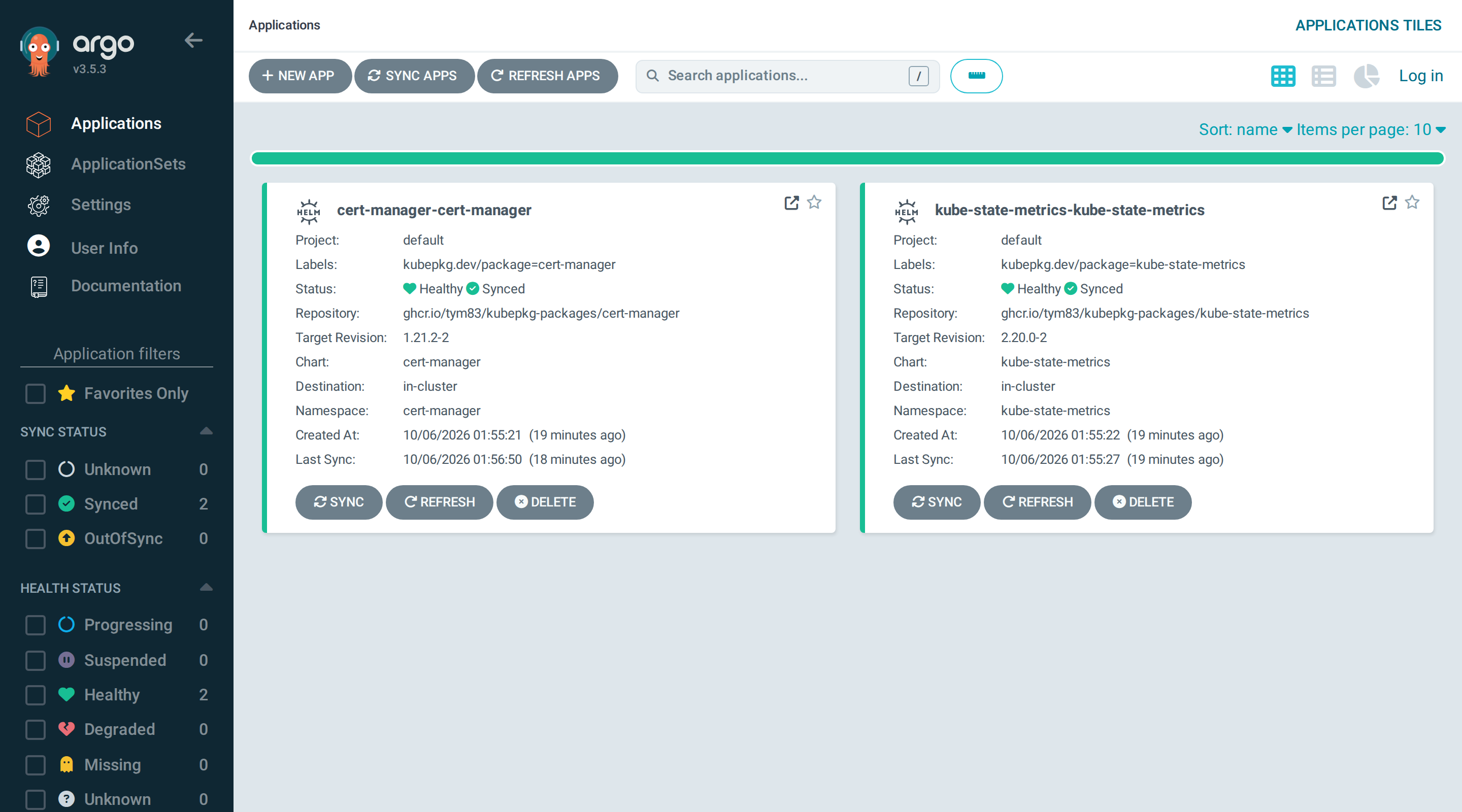
Like flux, this backend cannot roll back a whole package.
Writing your own
A backend is a Go type with four methods:
type Backend interface {
    Name() string
    Apply(ctx context.Context, c Component) (State, error)
    Status(ctx context.Context, c Component) (State, error)
    Rollback(ctx context.Context, c Component, toRevision int) (State, error)
    Uninstall(ctx context.Context, c Component) error
}
A distribution registers it by name in operator.Options.Backends and builds its own operator binary. See Embedding in a platform. The werf backend in pkg/backend/werf is a short, complete example of a backend that drives an external tool.